ShopDreamUp AI ArtDreamUp
Deviation Actions


Suggested Deviants


Suggested Collections


You Might Like…


Featured in Groups





Description
|||||||||||| Opacity 3.1 ||||||||||||
- Removed 1px border from most themes
- Added border and no-border rar files in Documents\Rainmeter\Skins\Opacity\IMAGES
extract the one u want to use
dont know if i changed much after the last update
so will put 3.0 link below
u can also just grab the theme image rar files
- opacity 3.0 - sta.sh/016qk3iybud2
- Theme image rar files
- Border - sta.sh/01igg1po4t2v
- NoBorder - sta.sh/06r3no7a3iy
extract in Documents\Rainmeter\Skins\Opacity\IMAGES
- After Install Right click rainmeter icon and choose layouts [CORETEMP] [HWINFO] [HWINFO-V5]
-------------------------------------------------------------------------------------------------
|||||||||||| Opacity 3.0 ||||||||||||
- Added HWiNFO sensors for version 5 and above
- Default plugin installed for HWINFO-V5
Older version is in the resource folder -- Documents\Rainmeter\Skins\Opacity\resources\
Copy HWiNFO.dll to \AppData\Roaming\Rainmeter\Plugins\
|||||||||||| Opacity 2.3 ||||||||||||
Theme youtube www.youtube.com/watch?v=YxAsPO…
- added Fonts Folder with popup menu on leftclick - choose any of the 13 Fonts
rainmeter wil refresh after you choose a Font
|||||||||||| Opacity 2.2 ||||||||||||
- added Themes Folder with popup menu on leftclick - choose any of the 13 themes
rainmeter wil refresh after you choose a theme
|||||||||||| Opacity 2.1 ||||||||||||
- added 5 new different skin themes
|||||||||||| Opacity 2 ||||||||||||
Updated theme with HWinfo sensors
- HWinfo www.hwinfo.com/
Maybe You will need to update the HWiNFO IDs included in "Documents|Rainmeter|Skins|Opacity|SETTINGS|Sensors.inc" "HwInfo64V5-Sensors.inc" to match the IDs for your system. To do this:
1 - ensure HWiNFO is running, with sensors and shared memory active
2 - run the included "Documents|Rainmeter|Skins|Opacity|resources|HWINFO|-|HWINFO-V5|"HWiNFOSharedMemoryViewer.exe" file - you can also launch this by clicking the Mainboard skin
3 - find the sensor reading you need (CPU Usage for example) and get the ID at the bottom right
4 - edit "Sensors.inc" "HwInfo64V5-Sensors.inc" to replace the provided ID with the ID for your system
5 - refresh the skin
For additional information, please see the following thread:
www.hwinfo.com/forum/Thread-Ra…
- added 2 layouts
layout Opacity_CoreTemp - doesn't use any HWinfo sensors - its the same as before
layout Opacity_HWinfo - you can uninstall coretemp
- changed CPU Frequency to CPU Fan speed
- added fade effect on startup and refresh - to enable this choose variants firefox skin "folderFadeEffect.ini"
refresh doesnt work correctly..so its disabled by default
enabled HWinfo sensors
- audible HDD temp warnings - edit "IfAboveValue=55" - Removed audible HDD space warning
- CPU Load hyperthreading on/off - choose skin variants for your setup..example hwinfo4coresHTon.ini or hwinfo4coresHToff.ini
- Ambient temp
- audible Northbridge temp - edit "IfAboveValue=75"
----left mouse click skins----
- MainBoard - opens HWiNFOSharedMemoryViewer.exe
- HWinfo plugins are included - you can also find them in the resource folder
- to adjust fade timing effect - right click rainmeter icon - choose "edit settings" add or change the settings
Group=All | NFade - these wil stay Visible after fade
FadeDuration=?
Group=All | Fade - these will not
FadeDuration=?
middle mouse on ram skin will activate fade effect
- added dual gpu folder for sli systems
|||||||||||| Opacity 1 ||||||||||||
- audible GPU temp warning - edit "IfAboveValue=79" to change
- audible CPU temp warning - edit "IfAboveValue=75" to change
- audible HDD space warning - edit "IfAboveValue=89" to change
- HDD read/write
- CPU skin - 2,4,6 cores - right click skin and choose variants
left mouse click skins
- CPU skin - opens taskmanager
- GPU skin - opens msi afterburner
- Ram skin - opens control panel
- Network skin - router acces - change it to your router ip
- Recycle bin skin - left mouse opens - right mouse empty bin
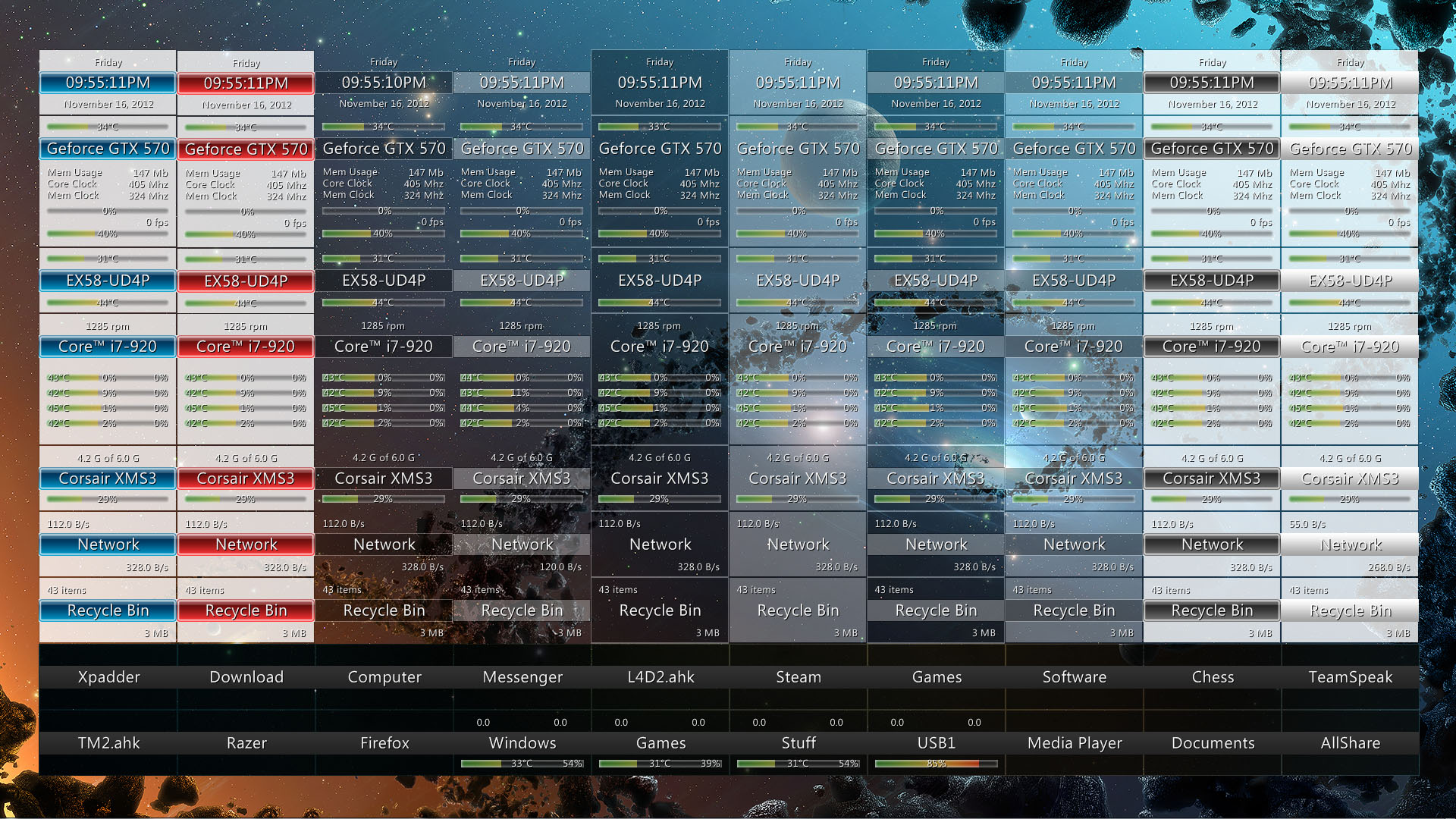
- 8 different skin themes located in "Documents|Rainmeter|Skins|Opacity|IMAGES" just extract the theme you want and refresh rainmeter
- psd files are in images folder
- group fade with sound effect - middle mouse on ram skin will activate it
- create your own audible warnings here - www.voiceforge.com/demo - i used damien
- shortcut links change example - ButtonCommand=!Execute ["????????????????"] to ButtonCommand=!Execute ["D:GamesSteamSteam.exe"]
- right click a skin and choose "edit skin" to change settings
- to edit shortcut or cpu name - edit Text="?????" under [MainTitle] in skins
- CPU and GPU skins need "msi afterburner and coretemp"
- GPU plugins are included - but here is link anyway - forums.guru3d.com/showthread.p…
- msi afterburner event.msi.com/vga/afterburner/…
- CoreTemp www.alcpu.com/CoreTemp/
original skin here fav.me/d47ra8p - 7Aero Suite 1.4
- Removed 1px border from most themes
- Added border and no-border rar files in Documents\Rainmeter\Skins\Opacity\IMAGES
extract the one u want to use
dont know if i changed much after the last update
so will put 3.0 link below
u can also just grab the theme image rar files
- opacity 3.0 - sta.sh/016qk3iybud2
- Theme image rar files
- Border - sta.sh/01igg1po4t2v
- NoBorder - sta.sh/06r3no7a3iy
extract in Documents\Rainmeter\Skins\Opacity\IMAGES
- After Install Right click rainmeter icon and choose layouts [CORETEMP] [HWINFO] [HWINFO-V5]
-------------------------------------------------------------------------------------------------
|||||||||||| Opacity 3.0 ||||||||||||
- Added HWiNFO sensors for version 5 and above
- Default plugin installed for HWINFO-V5
Older version is in the resource folder -- Documents\Rainmeter\Skins\Opacity\resources\
Copy HWiNFO.dll to \AppData\Roaming\Rainmeter\Plugins\
|||||||||||| Opacity 2.3 ||||||||||||
Theme youtube www.youtube.com/watch?v=YxAsPO…
- added Fonts Folder with popup menu on leftclick - choose any of the 13 Fonts
rainmeter wil refresh after you choose a Font
|||||||||||| Opacity 2.2 ||||||||||||
- added Themes Folder with popup menu on leftclick - choose any of the 13 themes
rainmeter wil refresh after you choose a theme
|||||||||||| Opacity 2.1 ||||||||||||
- added 5 new different skin themes
|||||||||||| Opacity 2 ||||||||||||
Updated theme with HWinfo sensors
- HWinfo www.hwinfo.com/
Maybe You will need to update the HWiNFO IDs included in "Documents|Rainmeter|Skins|Opacity|SETTINGS|Sensors.inc" "HwInfo64V5-Sensors.inc" to match the IDs for your system. To do this:
1 - ensure HWiNFO is running, with sensors and shared memory active
2 - run the included "Documents|Rainmeter|Skins|Opacity|resources|HWINFO|-|HWINFO-V5|"HWiNFOSharedMemoryViewer.exe" file - you can also launch this by clicking the Mainboard skin
3 - find the sensor reading you need (CPU Usage for example) and get the ID at the bottom right
4 - edit "Sensors.inc" "HwInfo64V5-Sensors.inc" to replace the provided ID with the ID for your system
5 - refresh the skin
For additional information, please see the following thread:
www.hwinfo.com/forum/Thread-Ra…
- added 2 layouts
layout Opacity_CoreTemp - doesn't use any HWinfo sensors - its the same as before
layout Opacity_HWinfo - you can uninstall coretemp
- changed CPU Frequency to CPU Fan speed
- added fade effect on startup and refresh - to enable this choose variants firefox skin "folderFadeEffect.ini"
refresh doesnt work correctly..so its disabled by default
enabled HWinfo sensors
- audible HDD temp warnings - edit "IfAboveValue=55" - Removed audible HDD space warning
- CPU Load hyperthreading on/off - choose skin variants for your setup..example hwinfo4coresHTon.ini or hwinfo4coresHToff.ini
- Ambient temp
- audible Northbridge temp - edit "IfAboveValue=75"
----left mouse click skins----
- MainBoard - opens HWiNFOSharedMemoryViewer.exe
- HWinfo plugins are included - you can also find them in the resource folder
- to adjust fade timing effect - right click rainmeter icon - choose "edit settings" add or change the settings
Group=All | NFade - these wil stay Visible after fade
FadeDuration=?
Group=All | Fade - these will not
FadeDuration=?
middle mouse on ram skin will activate fade effect
- added dual gpu folder for sli systems
|||||||||||| Opacity 1 ||||||||||||
- audible GPU temp warning - edit "IfAboveValue=79" to change
- audible CPU temp warning - edit "IfAboveValue=75" to change
- audible HDD space warning - edit "IfAboveValue=89" to change
- HDD read/write
- CPU skin - 2,4,6 cores - right click skin and choose variants
left mouse click skins
- CPU skin - opens taskmanager
- GPU skin - opens msi afterburner
- Ram skin - opens control panel
- Network skin - router acces - change it to your router ip
- Recycle bin skin - left mouse opens - right mouse empty bin
- 8 different skin themes located in "Documents|Rainmeter|Skins|Opacity|IMAGES" just extract the theme you want and refresh rainmeter
- psd files are in images folder
- group fade with sound effect - middle mouse on ram skin will activate it
- create your own audible warnings here - www.voiceforge.com/demo - i used damien
- shortcut links change example - ButtonCommand=!Execute ["????????????????"] to ButtonCommand=!Execute ["D:GamesSteamSteam.exe"]
- right click a skin and choose "edit skin" to change settings
- to edit shortcut or cpu name - edit Text="?????" under [MainTitle] in skins
- CPU and GPU skins need "msi afterburner and coretemp"
- GPU plugins are included - but here is link anyway - forums.guru3d.com/showthread.p…
- msi afterburner event.msi.com/vga/afterburner/…
- CoreTemp www.alcpu.com/CoreTemp/
original skin here fav.me/d47ra8p - 7Aero Suite 1.4
© 2012 - 2024 apophisss
Comments22
Join the community to add your comment. Already a deviant? Log In
how add 8 core in cpu monitor...